
Reduction in avg. data entry time per lead
INQ to OPP conversion time (from 1–2 min)
Increase in pipeline data completeness
Systems consolidated (NetSuite + sheets)
Sales reps onboarded at alpha wave
The problem
the system was:
Slow to load and hard to edit · Overly complex for high-volume workflows · Misaligned with Exxact's sales structure
as a result:
Reps tracked opportunities in spreadsheets/notebooks · Statuses and loss reasons inconsistently recorded · Leadership reporting was unreliable
at scale:
Each rep managed 450–500 opportunities/year · Tracking varied by individual · Data-entry friction discouraged adoption
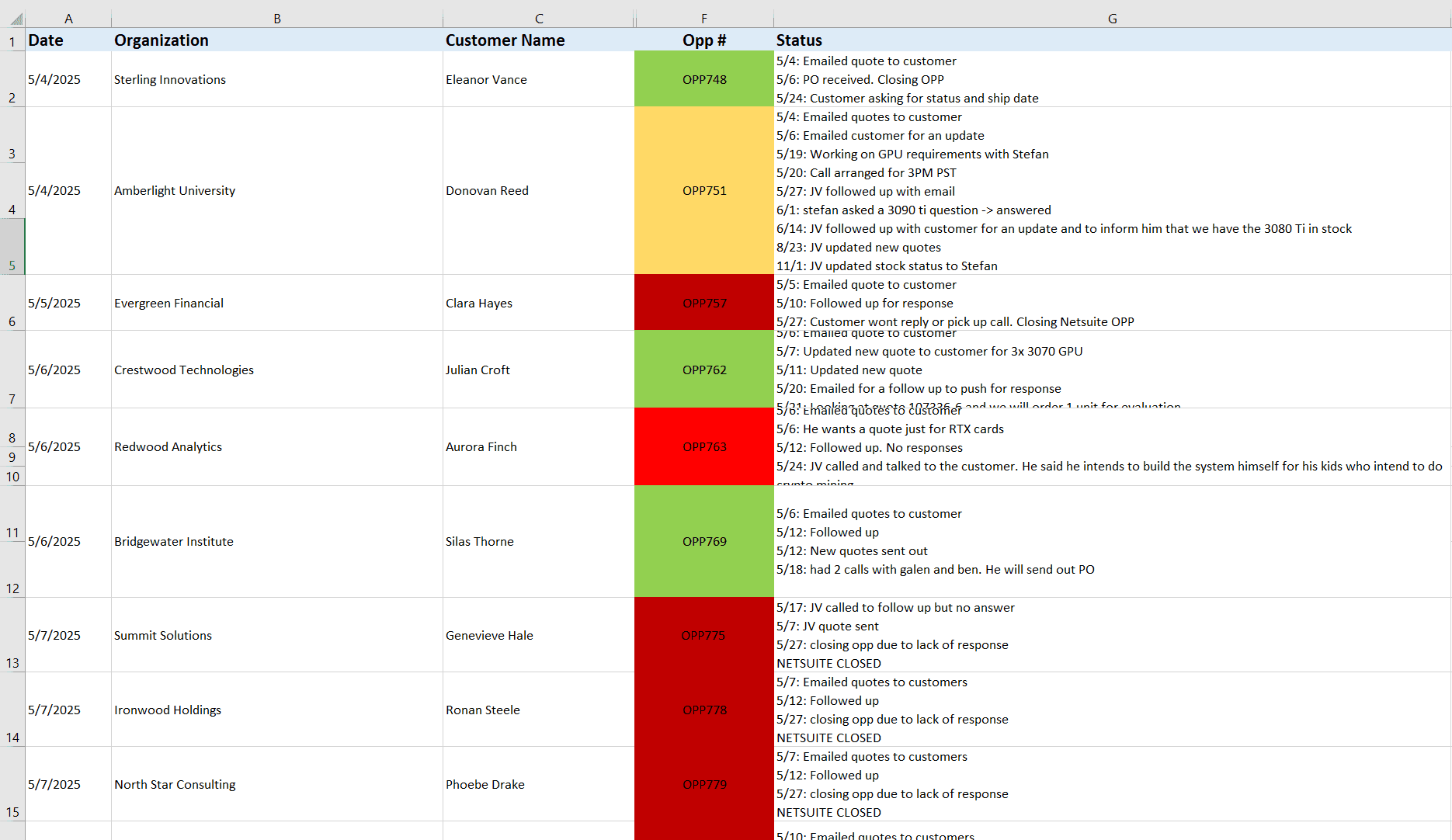
Before the CRM, opportunity tracking lived in spreadsheets like this one. They were color-coded by status, maintained manually, and inconsistent across reps.
Discovery
Before committing to a custom build, I evaluated whether an existing CRM could fit. Reviewed NetSuite (current), Zoho, and CapsuleCRM across information architecture, interaction patterns, editing speed, and scalability for high-volume transactions.
Discovery
None aligned with Exxact's sales structure or volume — a custom build was the only viable path.



| Tool | Info Architecture | Edit Speed | Scalability | Verdict |
|---|---|---|---|---|
| Netsuite (Current) | Rigid, deeply nested | Slow (8+ clicks per task) | Overkill, misaligned | ✗ Replaced |
| Zoho CRM | Modular but generic | Moderate | Scales but doesn't fit | ✗ Wrong structure |
| CapsuleCRM | Clean, simple | Fast for basic tasks | Limited at volume | ✗ Too lightweight |
| Custom Build | Designed for Exxact | Optimized per workflow | Built at growth | ✓ Selected |
Actionable insights
Speed is table stakes
Every tool failed on task speed. Users need 2-click editing, not 8-step flows.
Structure must match sales
Generic CRMs model contacts + deals. Exxact needed People, Companies, Opportunities as distinct objects.
Scalability from day one
The CRM needed to serve as a foundation for a future OMS and WMS — not a one-off tool.
I interviewed 4 internal stakeholders across sales roles. These insights informed MVP feature prioritization and a post-MVP wishlist.

From research and discovery, I established three guiding principles:
Optimize for speed and density
Design for real workflows, not idealized pipelines
Support edge cases from day one
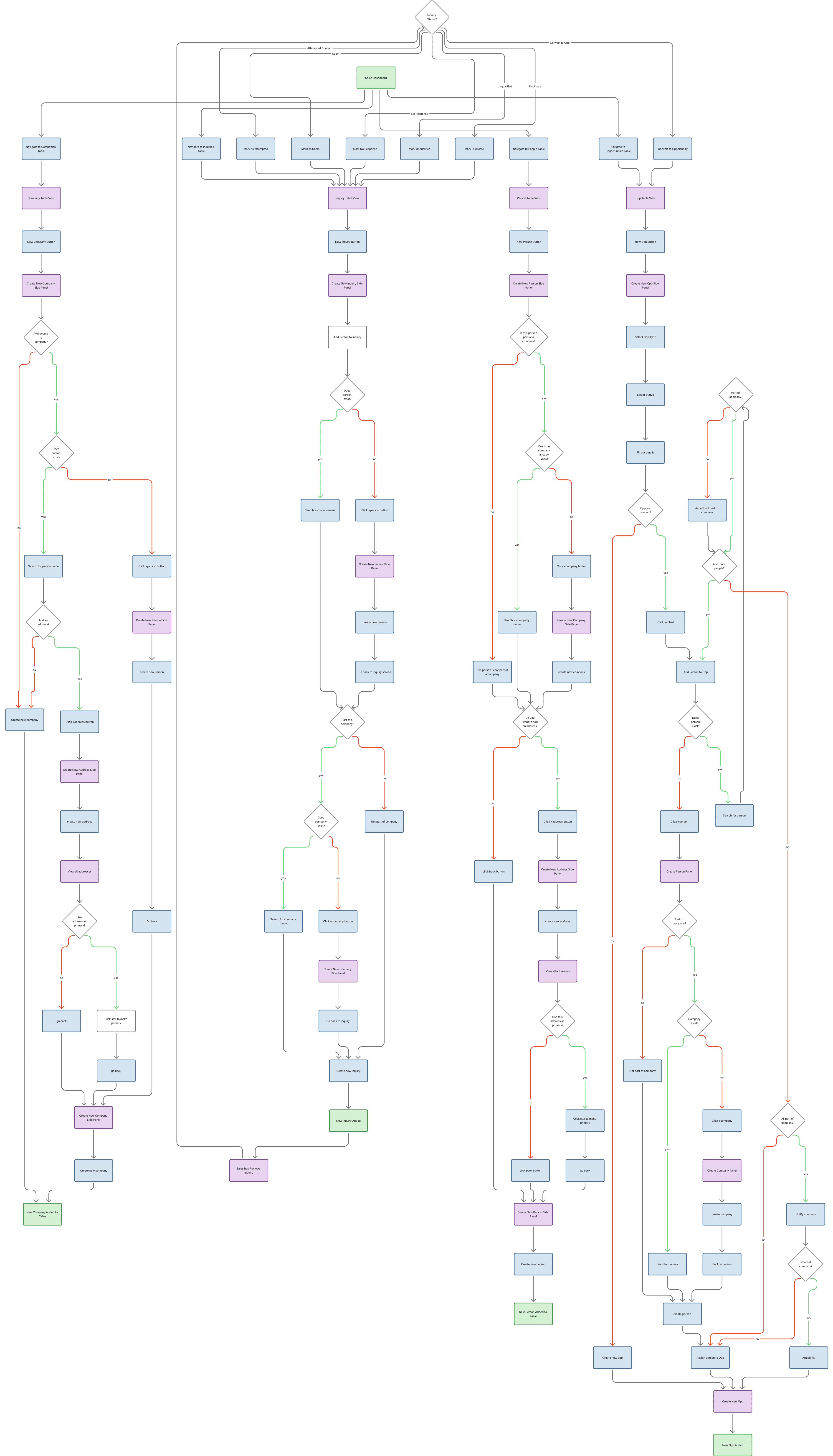
The flow diagram above maps the linear path between people, companies, inquiries, and opportunity creation which includes edge cases where a person buys for a company in one transaction but as an individual in another.
Scoping
Scoping this system meant separating three concerns that are easy to blur together: how records get created, how they get edited, and how their status changes as they move through a pipeline. Requirements were grouped by workflow area and prioritized based on research findings, alpha readiness, and development feasibility.
This case study follows those three threads — creation, editing, and status — through the four areas that shipped at alpha: People & Companies, Inquiries, Opportunities, and Search & Navigation. Transactions & Orders, Activity Logging, Reporting & Pipeline, and Admin & Settings were sequenced into later phases, building on this same foundation.
Discovery
None aligned with Exxact's sales structure or volume — a custom build was the only viable path.
MVP
POST-MVP
ITERATION 01
One of the primary flows established in a CRM is the ability to create entities, transactions, and edit them — starting with People, Companies, Inquiries, and Opportunities, the alpha scope. Getting this flow right would set the baseline for the core structure and interaction within the CRM. One of the first iterations for data entry was through guided forms. While it provided clear structure, it was hard to see all the information in one place and go back to edit that information.
WHAT WORKED
Step-by-step form wizard reduced cognitive load for new users. Clear field groupings made required vs. optional fields obvious.
WHAT DIDN'T
Senior reps found the multi-step flow too slow for updates they needed to make mid-call. They wanted to edit without re-entering forms.
ITERATION 02
Moving to side panels resolved all three problems at once and became the interaction blueprint for the rest of the application. Testing from iteration 1 revealed three requirements for the final pattern: keep critical info on one page, clearly differentiate edit and display modes, and handle edge cases like multiple companies, email addresses, and individual buyers.
WHAT CHANGED
Records created without leaving current view
Inline edits reduced context switching
Required clearer edit vs. view states
WHAT THIS UNLOCKED
Fast switching for high-volume workflows
Consistent pattern across all record types
Edge cases handled within one view
FINAL SOLUTION
Four decisions from the first iteration set the pattern every later record type would follow:
Side panels as the default for creating and editing. Records get created and updated without leaving the current view, so people stay in their flow instead of bouncing between pages.
Table-based views for high-volume record types. People, Companies, Inquiries, and Opportunities can run into the thousands, so the primary surface is a dense, scannable table built for managing volume rather than a card or detail-first layout.
Inline edits for in-place changes. The most common edits happen right in the table, cutting the open, edit, save, close loop. This is what made a clear edit-vs-view state necessary, so it's always obvious when a field is live.
Bulk actions across table selections. Repetitive changes get applied to many records at once instead of one at a time.
Together they shipped for People, Companies, Inquiries, and Opportunities at alpha and became the blueprint for every workflow area built in later phases.
Alpha Testing
The prototype launched to 14 sales reps. Junior reps logged leads and created opportunities. Senior reps managed accounts and tracked pipeline progress.
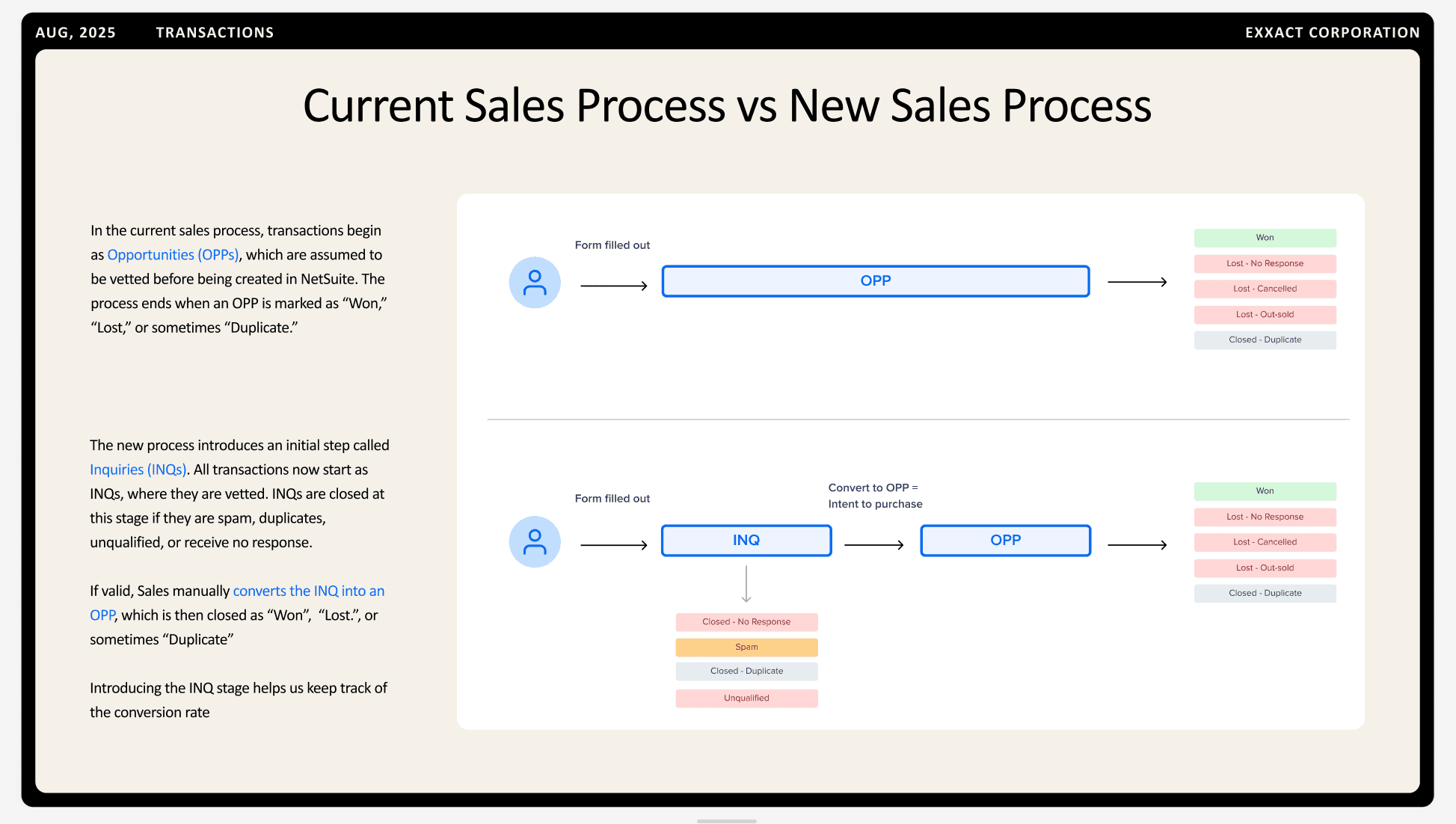
To support early adoption, I built and delivered an onboarding slide deck (Thank you Figma Slides) before the first session, giving reps enough context to push the system rather than just explore it cautiously. This accelerated usability feedback significantly.
Reflection
How this project felt, measured in challenge, teamwork, and the occasional missed lunch.
Research
Talking to users changed everything
Without interviews, we would have built a kanban pipeline no one would use. Watching reps manage 450–500 opps a year reframed our direction before a single screen was designed.
Complexity
Scoping is a design decision
Prioritization meant choosing creation, editing, and status logic first — not because they were most requested, but because every other workflow depends on getting those three right.
Iteration
The blueprint matters more than the feature
Getting the core create/edit pattern right before individual workflows saved significant rework and gave the whole team a stable foundation to build from.
Adoption
Design doesn't end at handoff
Building the onboarding deck reminded me that helping reps understand the why behind the new system was part of the design problem, not an afterthought.

